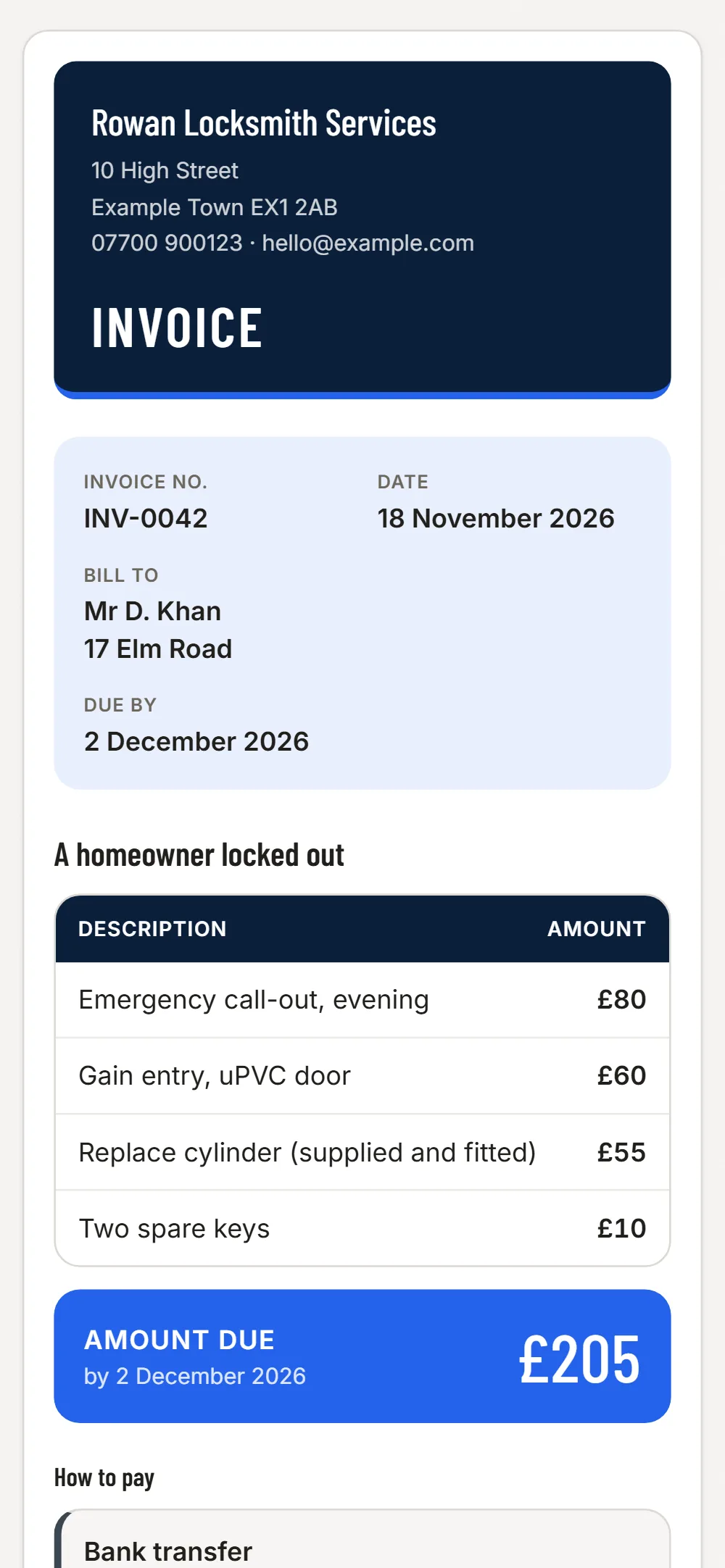
Call-out, labour and parts on separate lines
Out-of-hours call-out, the lock itself, fitting and a second key are different things. Listing them separately avoids the argument about what the price is made of - and the PDF looks like a firm, not a scribble.
Landlords, agents and insurers
Property managers and insurance-backed work pay against an invoice number and often a job reference. Add the reference in a line and send it straight to their accounts email.
Reminders without the awkward call
Some customers pay on the spot, some say they will. The overdue list shows the second group, and a reminder goes out in one tap.
Stock and mileage
Photograph the receipt for cylinders, locks and fuel as you buy them and sort them into materials, fuel or tools.
Easy to miss on a locksmith’s invoice
- Out-of-hours or emergency uplift
- Travel to a distant job
- Replacement keys or cylinders
- Hardware you fitted, listed by name
- A return visit for a second lock
- The reference number from an agent or insurer
JobGuard lists items like these under Easy to miss before you send the quote.
Write it
Pick the client, type the lines and prices. VAT is added if you are VAT registered.
Send it
A PDF and a link by email. Your client needs no app and no account.
See who has paid
Paid, waiting or overdue in one list, with a reminder in one tap.
Free
No card needed
- Your first 3 invoices
- PDF and a link to your client
- Paid, waiting and overdue in one list
- Automatic reminders for late payers
Invoices £6 a month
Everything in Free, and
- Unlimited invoices, and repeat one in a tap
- Set an invoice to repeat weekly or monthly: a new draft each time, never sent for you
- Choose your look: six colour styles, on screen, PDF and email
- Receipts and costs: photograph a receipt, JobGuard reads it (100 a month), download for your accountant
Free locksmith invoice template · Invoice apps for other trades
Questions
Can I take card payment through the invoice?
No. JobGuard sends the invoice and tracks paid or overdue. Take payment the way you do today, for example a card reader on the doorstep or a bank transfer.
Can I add a job reference?
Yes. Type it in a line or the notes on the invoice so the client’s accounts team can match it.